



✦ Free Drawing Tool Online

AR Drawing Online Free Trace Tool

Use your phone camera to trace sketches on real paper. Pick a step-by-step template, upload your own image, and start drawing with AR online — no app download needed.

Smiling blue-haired anime boy in a phone, with his pencil sketch extending beyond it
Live Experience

Experience Drawing in AR

See how our technology guides your hand, making complex sketches accessible to everyone.

Blue-haired anime boy pointing downBlue-haired anime boy winking and pointing down
ardrawing.site
Step-by-Step Guide

How to Use this Tool

Create beautiful drawings on paper using augmented reality in 4 easy steps. No app download required, works entirely in your browser.

01

Choose Your Image

Pick any sketch outline from our free template gallery, or upload your own reference image to trace.

02

Mount Your Phone

Place your phone on a glass or transparent stand so the camera faces down onto your paper surface.

03

Trace the Lines

Look at your phone screen and follow the AR overlay lines with your pencil directly on the paper. Adjust opacity as needed.

04

Master Your Art

With every sketch, your hand builds muscle memory. Soon you'll draw confidently without any AR assistance.

Why Choose
this Tool?

Your personal AR studio. Sketch anything, anywhere, on any paper.

01

No App Install Needed

Experience the full power of AR directly in your mobile browser. No downloads, no storage waste, just pure creativity.

02

Universal Compatibility

Our engine is optimized to run smoothly on virtually any modern smartphone, ensuring a great experience for everyone.

03

Ultra-Low Latency

High-performance camera processing ensures that the virtual lines follow your paper with zero noticeable lag.

04

100% Free Access

All core sketching and AR tools are completely free. We believe everyone should have access to the tools of art.

05

Use Your Own Images

Upload your favorite reference, adjust it on screen, and trace exactly what you want to draw.

06

Better Daily Practice

Follow clean guides on paper and build confidence with each sketch, character, or outline you finish.

AR Drawing Guide

What is AR Drawing?

AR Drawing is a simple way to trace and sketch on real paper using your phone camera. You choose a picture or a step-by-step template, place your phone above the page, and the image appears on your screen as a guide while you draw.

This free AR drawing tool is made for beginners, students, anime fans, coloring lovers, and anyone who wants cleaner outlines without guessing proportions. There is no app download needed. Open the tool, pick a drawing template, adjust it to fit your paper, and start tracing at your own speed.

Is AR Drawing free?

Yes. AR Drawing is free to use for browser-based tracing, sketching, templates, and basic drawing practice.

Do I need an account?

No account is required. Open the AR Drawing tool in your mobile browser, choose a template or upload an image, and start tracing.

What devices are supported?

AR Drawing works on modern Android and iOS phones with a camera and a browser such as Chrome or Safari.

Is my camera feed uploaded?

No. The camera view is used for the live tracing overlay on your device. Your private photos, sketches, and camera feed are not uploaded to AR Drawing servers.

01Pick an image
02Line up your paper
03Trace and learn

What Our Users Say

Real feedback from our drawing community.

“I love this app.”

— Maya

“This is so useful for everyone who loves sketching.”

— Sulav

“I was drawing a chibi Miku. I messed up one hand, but it was still good :D”

— Leah

“Amazing! It helps with my drawings.”

— Abigail

“I really appreciate that this tool is free. It has helped me practice drawing anything I want.”

— Kianae

“So good! You help me draw.”

— Jasmine

“It was very good! You should try it at least once. Thank you!”

— Anup naik A

“Great website!”

— Adeline Ng

“It's really good and helps me draw.”

— nataa

“Loved it.”

— Resho

“Love it!”

— aurora

“It works.”

— Kyrie

Contact Us

Need help with AR Drawing? Send a message and we will get back to you.

Send us a Message

We typically respond to all inquiries within one business day.

Blue-haired anime boy waving and holding an envelope

“I'm always here to help you! Feel free to reach out anytime.”

About AR Drawing

Turn a picture on your phone into a drawing you make on real paper.

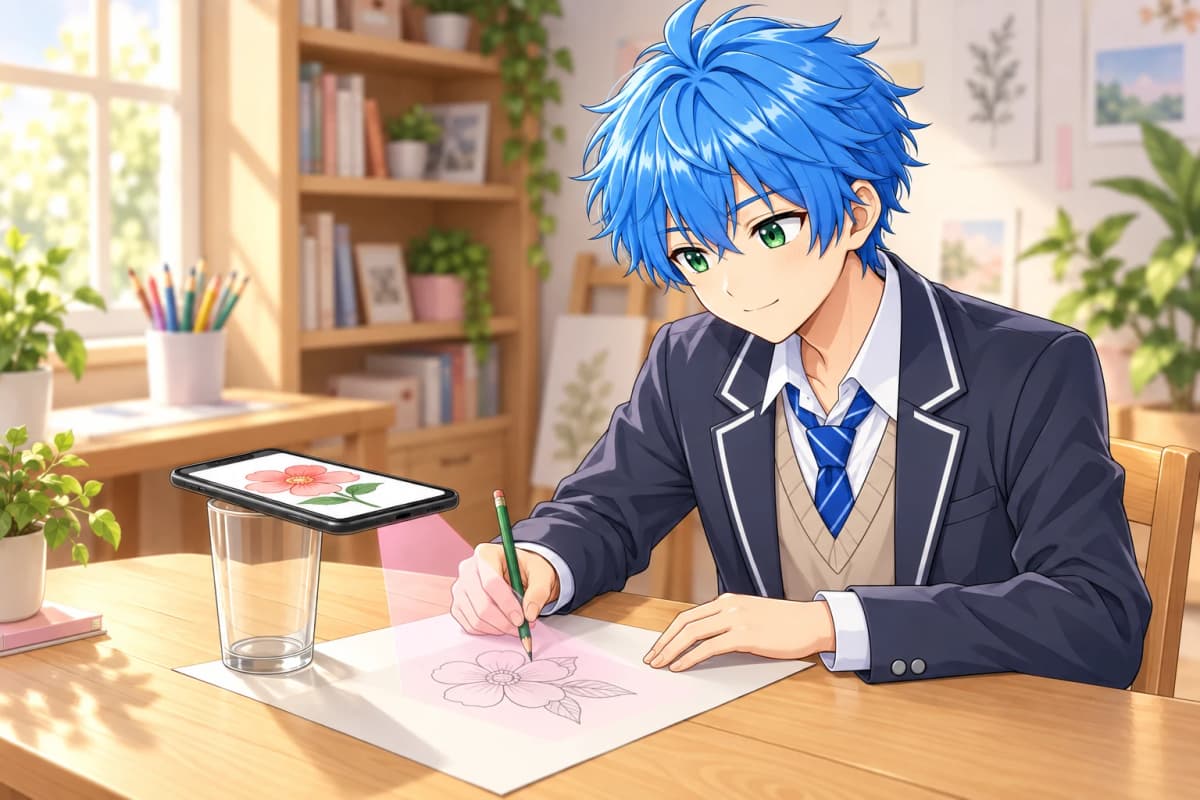
Blue-haired anime boy using a phone supported on a glass to follow a flower drawing guide on paper
How it works

See the guide. Draw it yourself.

AR Drawing places your chosen image over the live camera view of your paper. You see the guide on your phone screen while your pencil draws directly on the page.

Set your phone above the paper like the example, line up the guide, and trace at your own pace. Choose a template or use your own picture. It works in your mobile browser, with no app download.

01

Choose a picture

Pick a template or upload your own image, then open your phone camera.

02

Set up your guide

Rest your phone above the paper and adjust the image size and opacity on screen.

03

Draw on paper

Look at the phone screen and follow the visible lines with your pencil.

Frequently Asked Questions

AR Drawing is a free online tool that uses your phone camera to overlay a reference image onto your real paper surface. You look at your phone screen and trace the lines you see directly onto the paper. It works entirely in your browser — no app download is required.

No. AR Drawing runs entirely in your mobile browser. Just open the website on your phone, pick a picture, allow camera access, and start drawing on paper immediately. There is no need for app store downloads or registrations.

Yes, AR Drawing is 100% free. All core features including camera sketching, tracing templates, opacity control, and the template gallery are available at no cost to help everyone learn to draw.

Absolutely! AR Drawing is designed for everyone, especially beginners. The AR overlay guides your hand by showing you exactly where to draw each line. Over time, your hand naturally develops muscle memory and you get better at sketching without assistance.

AR Drawing works on any modern smartphone (iOS or Android) with a working camera and a web browser like Chrome or Safari. No special hardware is needed — just your phone, a stand or support cup, and a piece of paper.

Simply open ardrawing.site on your mobile web browser, pick any outline from our free template library, mount your phone on a glass stand or support, align the camera to your paper, and start drawing lines as seen on your screen. It is that simple!

ardrawing.site is the best free AR drawing website available online. Unlike apps that require downloads and take up storage, our tool runs directly in your browser. It offers real-time camera overlay, hundreds of free drawing templates, a coloring studio, and advanced features like opacity control — all completely free with no ads.

To trace drawings on paper with your phone camera, visit ardrawing.site, select a template or upload your own image, mount your phone on a glass or transparent stand above your paper, and trace the lines shown on screen. The AR overlay projects the image onto your camera feed so you can precisely follow each line with your pencil.

AR Drawing online at ardrawing.site has several advantages: no download or installation required, works on any smartphone browser, does not consume device storage, always up-to-date, completely free to use, includes a coloring studio, and offers hundreds of free templates. Traditional apps often have ads, paid features, and compatibility issues.

Yes! AR Drawing includes a free Coloring Studio where you can color sketches and outlines digitally with professional tools like flood fill, smooth brushes, and a wide variety of colors. It is perfect for kids and adults who enjoy coloring pages online.

Cute white cat mascot♡

Ready to Create?

Join thousands of artists and start your drawing journey today.